


Exam Questions Answers Braindumps 220-1201 Exam Dumps PDF Questions
Download Free CompTIA 220-1201 Real Exam Questions
NEW QUESTION # 85
Which of the following best describes the concept of a DHCP lease?
- A. A reservation of an IP configuration for a device on the network
- B. A translation of network names to IP addresses for a device on the network
- C. A definition of the scope of addresses to be assigned to a device on the network
- D. A temporary assignment of an IP configuration to a device on the network
Answer: D
Explanation:
A DHCP lease is a temporary assignment of an IP address and other network configuration parameters (such as DNS and gateway) to a device. The lease is renewed periodically to maintain the assignment.
NEW QUESTION # 86
A user is having trouble with the location services on their smartphone. Location-based applications show incorrect positions when the user is traveling. This issue affects the user's ability to navigate and use location- dependent applications. Which of the following is the best way to resolve this issue?
- A. Downloading a third-party mapping application
- B. Restarting the smartphone
- C. Resetting the network settings
- D. Enabling Wi-Fi to assist GPS
Answer: D
Explanation:
Wi-Fi assistance in mobile devices helps improve location accuracy by using nearby wireless networks to triangulate the device's position, even when GPS signals are weak (like indoors or in dense areas).
Reference: CompTIA A+ Certification Exam Core 1 Objectives - Domain 1.0 Mobile Devices - Objective
1.6: Troubleshoot common issues with mobile devices.
NEW QUESTION # 87
Which of the following is a Bluetooth network an example of?
- A. WAN
- B. LAN
- C. PAN
- D. SAN
Answer: C
Explanation:
Bluetooth networks connect devices like smartphones, headphones, or mice over short distances, forming a Personal Area Network (PAN). These are designed for small-scale communication around the user.
Reference:CompTIA A+ Certification Exam Core 1 Objectives - Domain 2.0 Networking - Objective 2.4:
Compare and contrast wireless networking protocols.
NEW QUESTION # 88
A company will retire a legacy application in one year but wants to decommission the physical environment now. Which migration method is best?
- A. Relocating the server to a colocated data center
- B. Performing a physical-to-virtual conversion and hosting on IaaS
- C. Deploying all components using PaaS
- D. Taking a backup and shutting down the server
Answer: B
Explanation:
CompTIA A+ emphasizes virtualization as an ideal solution during system phase-out or transition periods.
The correct approach here is a P2V (physical-to-virtual) conversion and hosting the server in an Infrastructure as a Service (IaaS) environment. This removes the need for physical hardware while still keeping the application operational for its final year. IaaS provides full control over OS and applications, making it suitable for legacy systems that cannot be rewritten.
Colocation (Option A) still requires physical hardware. PaaS (Option C) is inappropriate because PaaS requires rewriting or replatforming the application. Shutting down the server after a backup (Option D) makes the application immediately unusable.
Thus, the best method is to convert to a virtual machine and host it on IaaS.
NEW QUESTION # 89
Which of the following RAID configurations can lose two drives without data loss?
- A. RAID 1
- B. RAID 0
- C. RAID 6
- D. RAID 5
Answer: C
Explanation:
Comprehensive and Detailed Explanation From Exact Extract:
RAID 6 uses two parity blocks, allowing it to tolerate the failure of two drives without losing data.
Reference: CompTIA A+ Core 1 220-1201 Official Study Guide, Section: RAID TypesRAID 6 supports dual- drive failure tolerance with dual parity, making it more fault-tolerant than RAID 5.
NEW QUESTION # 90
A company migrates a local application to an internal cloud platform. Which of the following best describes this cloud platform?
- A. Community
- B. Hybrid
- C. Private
- D. Public
Answer: C
Explanation:
An internal cloud platform operated exclusively for a single organization is a private cloud, providing dedicated resources and enhanced control.
NEW QUESTION # 91
Which of the following is an advantage of NVMe SSDs over HDDs?
- A. Higher spindle speed
- B. SATA interface
- C. Larger available capacity
- D. Smaller form factor
Answer: D
Explanation:
Among the listed choices, a smaller form factor is the advantage associated with NVMe solid-state drives.
Many client NVMe drives use the compact M.2 form factor and connect directly to the motherboard, eliminating the larger drive enclosure and separate data and power cables commonly required by traditional
2.5-inch or 3.5-inch hard disk drives. NVMe drives also contain no mechanical platters, spindle motors, or moving read/write heads. SATA is not an advantage of NVMe because NVMe normally communicates through PCI Express rather than the SATA interface. HDDs are often available in larger capacities at lower prices, so larger available capacity is not generally an NVMe advantage. Spindle speed applies only to mechanical hard drives; SSDs do not contain a spindle. Technically, NVMe describes a storage communication protocol, but compact M.2 NVMe devices are the intended comparison in this question.
NEW QUESTION # 92
When traveling in another country, a user is unable to receive calls or emails on their mobile phone. Which of the following should the technician verify is enabled on the user's device?
- A. Domestic calling plan
- B. Bluetooth connectivity
- C. International eSIM
- D. Personal hotspot
Answer: C
Explanation:
An international eSIM or roaming configuration enables a mobile device to connect to foreign carrier networks, allowing the user to make and receive calls, texts, and access mobile data (including email) while traveling abroad.
NEW QUESTION # 93
A customer reports that their cell phone does not adjust the picture when the phone is rotated into landscape position. A technician verifies that the orientation settings in the software are configured correctly. Which of the following components is most likely malfunctioning?
- A. GPS module
- B. Antenna
- C. Front-facing camera
- D. Accelerometer
Answer: D
Explanation:
The accelerometer is the component most likely malfunctioning. A mobile-device accelerometer measures changes in movement, tilt, and orientation along multiple axes. The operating system uses this sensor data to determine whether the device is being held vertically in portrait mode or horizontally in landscape mode.
Because automatic rotation is enabled correctly in the software, the failure to detect physical rotation points to a sensor problem rather than a configuration problem. The antenna handles wireless communications such as cellular, Wi-Fi, Bluetooth, or GPS reception and does not detect screen orientation. The front-facing camera captures images and supports video calls or facial-recognition functions. The GPS module determines geographic position using satellite signals but does not control display rotation. A failed or unresponsive accelerometer would therefore prevent the operating system from recognizing that the phone has been rotated and changing the screen orientation accordingly.
NEW QUESTION # 94
Which of the following network services is used to assign an IP address to a network host?
- A. DNS
- B. DHCP
- C. SMTP
- D. LDAP
Answer: B
Explanation:
DHCP (Dynamic Host Configuration Protocol) is the service used to automatically assign IP addresses to network hosts. It dynamically manages the distribution of IP addresses and configuration details (like subnet mask, gateway, and DNS servers), ensuring no two devices are assigned the same address on the network.
NEW QUESTION # 95
After a user builds their first PC, the user needs to install the operating system from a USB drive.
Which of the following should the user configure next?
- A. Boot order
- B. PXE boot
- C. BIOS password
- D. Secure Boot
Answer: A
Explanation:
To install an operating system from a USB drive, the system must be configured to check the USB device before the internal storage during startup. Setting the boot order ensures the computer boots from the USB drive so the operating system installer can run.
NEW QUESTION # 96
A technician needs to select PC components with a minimal number of visible internal cables. Which of the following should the technician use?
- A. Wireless NIC
- B. Modular power supply
- C. Liquid cooling
- D. SATA drive connections
Answer: B
Explanation:
Comprehensive and Detailed In-Depth Explanation:
Amodular power supplyallows a technician toconnect only the power cables that are needed, reducing clutter and improving airflow. This is ideal when aiming for a clean build withminimal visible internal cables.
* Option A (SATA drive connections):Still require both power and data cables, adding to cable count.
* Option B (Liquid cooling):May reduce some bulk from large air coolers, but adds tubing and still needs cabling.
* Option D (Wireless NIC):Adds wireless capability but has no relation to internal cabling cleanliness.
CompTIA A+ Core 1 Exam Objective Reference:
* Objective 3.3: Given a scenario, apply the appropriate PC configuration.
NEW QUESTION # 97
A technician is putting RJ45 connectors on Cat 6 cables. Which of the following tools should the technician use to secure the connectors?
- A. Crimping
- B. Wire cutters
- C. Loopback plug
- D. Punchdown
Answer: A
NEW QUESTION # 98
A small company recently added VoIP through its ISP. Users report intermittent call quality issues during peak hours. Which of the following steps should the IT administrator take to solve the issue?
- A. Install a shielded network cable.
- B. Configure the VLAN to split services.
- C. Increase the VoIP bit rate.
- D. Route calls through a gigabit port.
Answer: B
Explanation:
Comprehensive and Detailed Explanation
CompTIA A+ VoIP and network performance topics stress the importance of Quality of Service (QoS) and traffic separation.
Creating a separate VLAN for VoIP:
* Reduces congestion
* Prioritizes voice traffic
* Prevents voice packets from competing with data traffic
* Improves latency, jitter, and packet loss issues during peak hours
This directly fixes intermittent VoIP quality issues.
Why the other options are incorrect
B). Route calls through a gigabit port - Internal port speed is not the bottleneck; congestion is.
C). Shielded cable - Does not solve bandwidth or QoS issues.
D). Increase bit rate - Makes the problem worse, requiring more bandwidth.
NEW QUESTION # 99
Which of the following networking technologies allows for high-speed data transmission over short distances between devices like smartphones and tablets?
- A. Zigbee
- B. Near-field communication
- C. Wi-Fi Direct
- D. Infrared
Answer: C
Explanation:
Wi-Fi Direct is designed to provide high-speed, short-range wireless communication directly between devices such as smartphones, tablets, laptops, and printers without requiring a traditional wireless access point. According to CompTIA Core 1 (220-1201) networking objectives, Wi-Fi Direct uses standard Wi-Fi radio technology, allowing devices to communicate at speeds comparable to typical wireless LAN connections.
Near-field communication (NFC) operates at extremely short distances (typically a few centimeters) and supports very low data transfer rates, making it unsuitable for high-speed data transmission. Zigbee is a low-power, low-bandwidth protocol commonly used for IoT and home automation devices, not for high-speed data sharing. Infrared requires line-of-sight and offers limited data rates, which restricts its usefulness for modern mobile devices.
Wi-Fi Direct is commonly used for tasks such as file sharing, screen mirroring, and device-to-device printing. CompTIA emphasizes understanding the differences between short-range wireless technologies, particularly distinguishing high-throughput solutions like Wi-Fi Direct from low-power or proximity-based technologies.
NEW QUESTION # 100
Which of the following drive interfaces is typically used in server systems but not in home computers?
- A. PCIe
- B. SAS
- C. SATA
- D. NVMe
Answer: B
Explanation:
SAS (Serial Attached SCSI) is a high-performance drive interface commonly found in enterprise environments and servers due to its reliability and speed. While SATA is more common in consumer systems, SAS is specifically designed for mission-critical applications, offering features like full-duplex operation and compatibility with SATA drives.
NEW QUESTION # 101
The power supply for a user's gaming computer fails. The user buys a replacement online. The user connects the power supply to the motherboard, the graphics card, and the SSDs, but the computer fails to start and displays a critical error. Which of the following is the most likely cause?
- A. The computer requires an additional RAM upgrade.
- B. The power supply only operates in a redundant configuration
- C. The user did not connect the 4-pin connector for the CPU.
- D. The wattage is insufficient for all the peripherals.
Answer: C
Explanation:
Modern motherboards require two separate power connections from the power supply: the 24-pin ATX connector for general motherboard power and a 4-pin or 8-pin CPU (EPS) connector dedicated to powering the processor. According to CompTIA Core 1 (220-1201) power supply installation and troubleshooting guidelines, failing to connect the CPU power connector commonly results in a system that does not boot and may display a critical or CPU-related error.
In this scenario, the user connected power to the motherboard, graphics card, and storage devices, but the system fails to start. This strongly indicates that the CPU power connector was overlooked, which is a frequent mistake during PSU replacement. Without this connection, the processor cannot initialize, preventing POST.
Insufficient wattage typically causes instability, shutdowns, or reboots under load rather than immediate failure with a critical error. RAM upgrades are unrelated to PSU replacement, and redundant power supplies are used in enterprise systems, not standard gaming PCs.
CompTIA emphasizes verifying all required PSU connectors, especially the CPU power connector, as a critical troubleshooting step when a system will not power on after a PSU replacement.
References:CompTIA A+ Core 1 (220-1201) Official Study Guide - Power Supplies, Connectors, and Troubleshooting
NEW QUESTION # 102
A company wants to enable access to corporate email on smartphones. Employees will choose from a list of supported devices but must install software that separates corporate and personal data. Which of the following should the company implement to achieve this goal?
- A. Endpoint protection
- B. Encryption
- C. Mobile device management
- D. Network access control
Answer: C
Explanation:
The correct solution for this scenario is Mobile Device Management (MDM). According to CompTIA Core
1 (220-1201) mobile device security and management objectives, MDM is specifically designed to manage, secure, and enforce policies on mobile devices used to access corporate resources.
MDM solutions allow organizations to require employees to install management software on their smartphones before accessing corporate email. One of the key features of MDM is data separation, often referred to as containerization, which keeps corporate data isolated from personal data on the same device.
This ensures that company information remains secure while still allowing employees to use their devices for personal purposes.
Encryption alone protects data but does not enforce separation or centralized control. Network access control (NAC) restricts which devices can connect to a network but does not manage data on the device itself.
Endpoint protection focuses on malware prevention and threat detection, not policy enforcement or data separation.
CompTIA emphasizes MDM as the primary solution for BYOD (Bring Your Own Device) and corporate mobile access scenarios, making it the most suitable and complete answer for this requirement.
References:CompTIA A+ Core 1 (220-1201) Official Study Guide - Mobile Device Management (MDM), BYOD Policies, and Mobile Security
NEW QUESTION # 103
A third-party contractor recently installed a new switch, router, and cabling for a small corporate office. After the installation, users started experiencing issues connecting to resources over the network.
INSTRUCTIONS
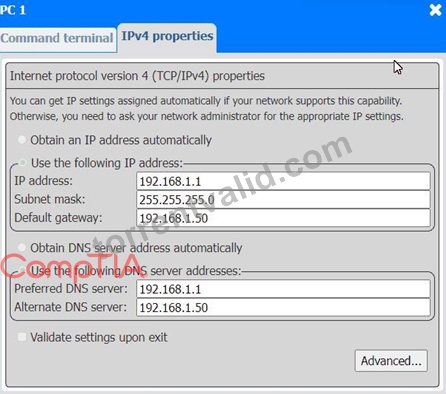
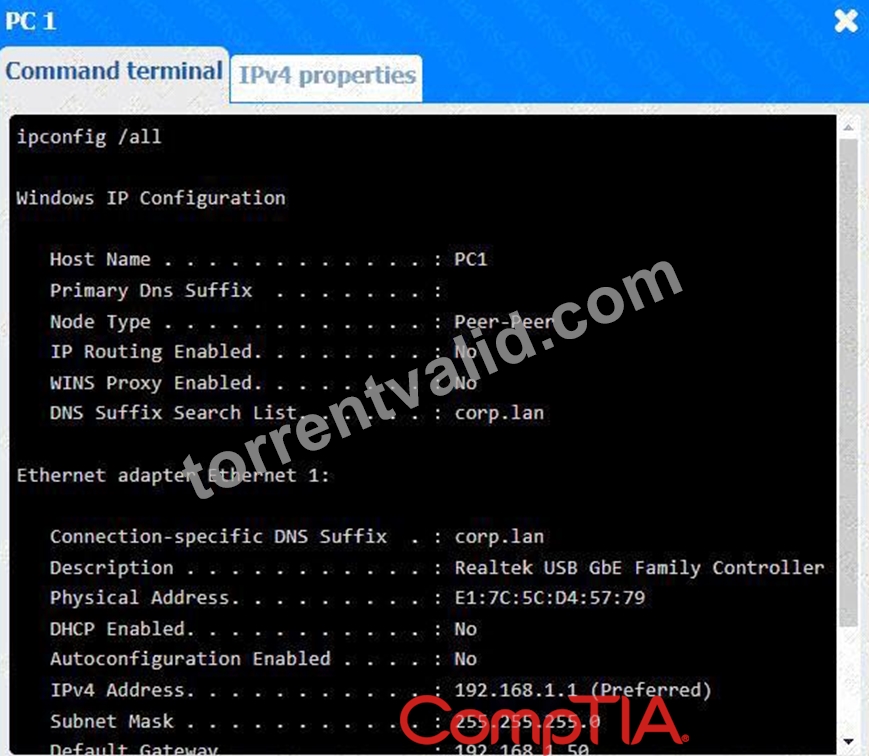
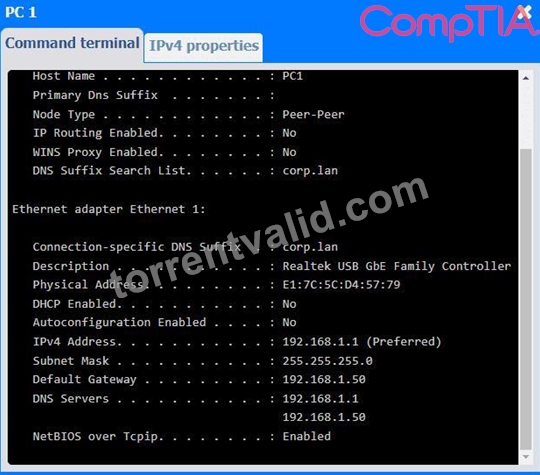
Click on each PC and server to review outputs. From the remediation section on the right, select an issue and solution for each device.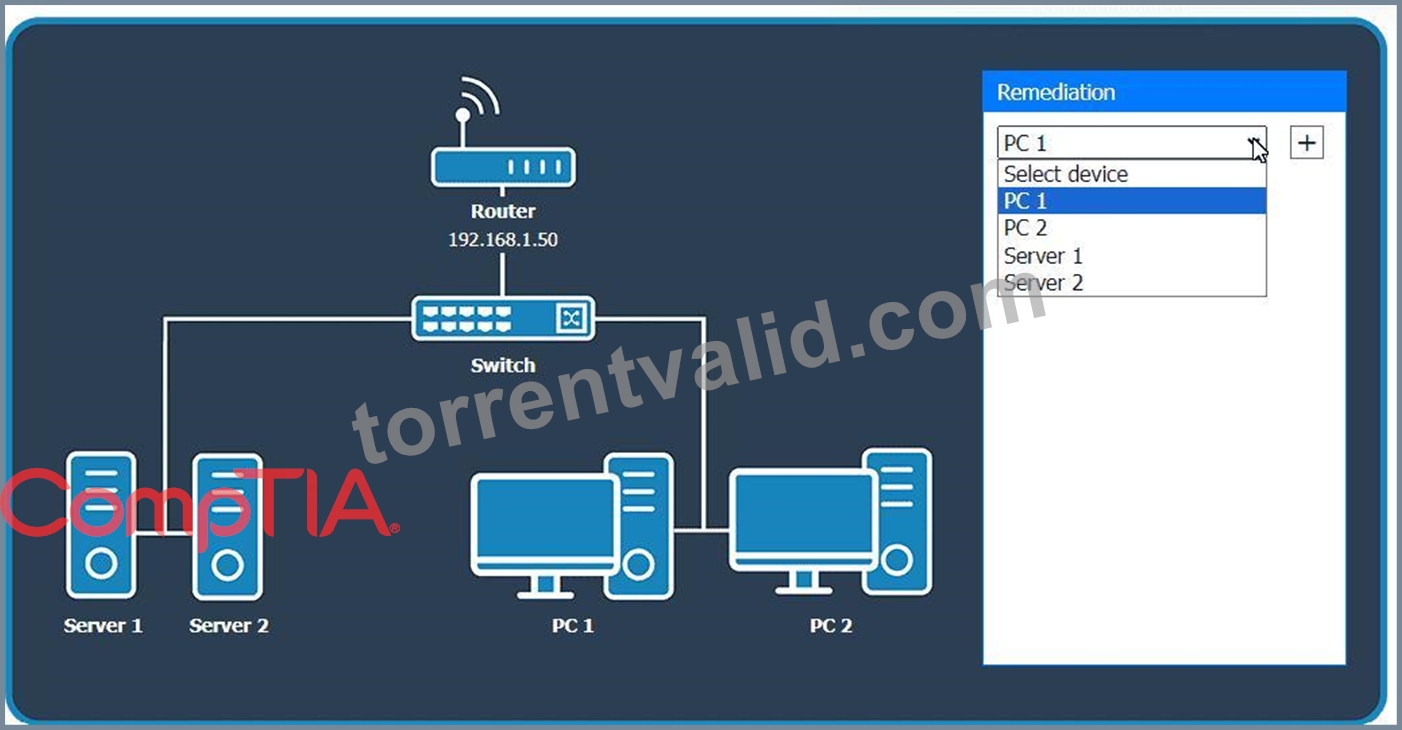
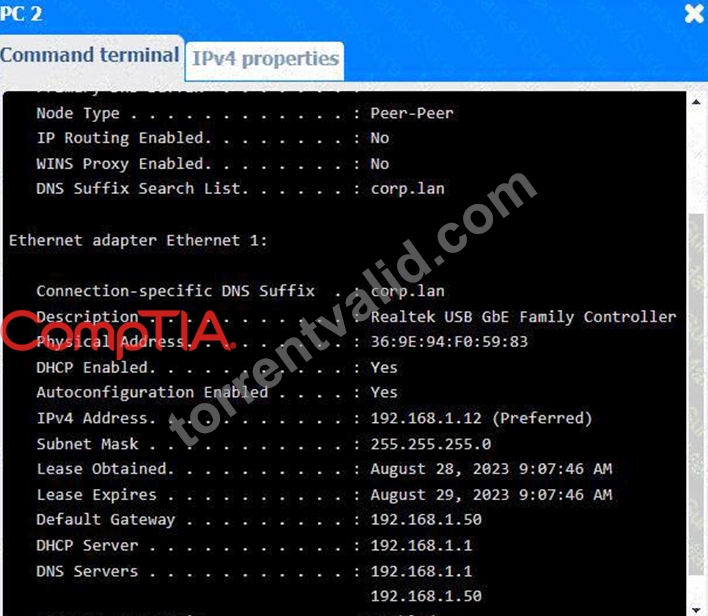
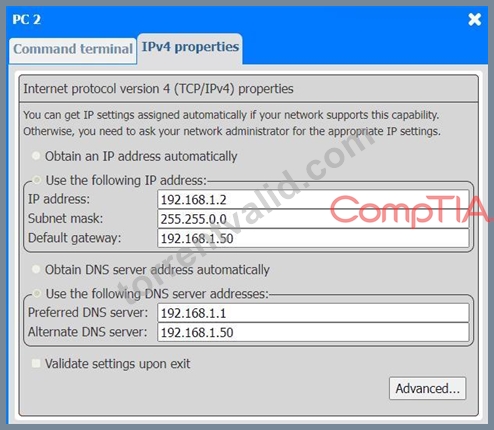
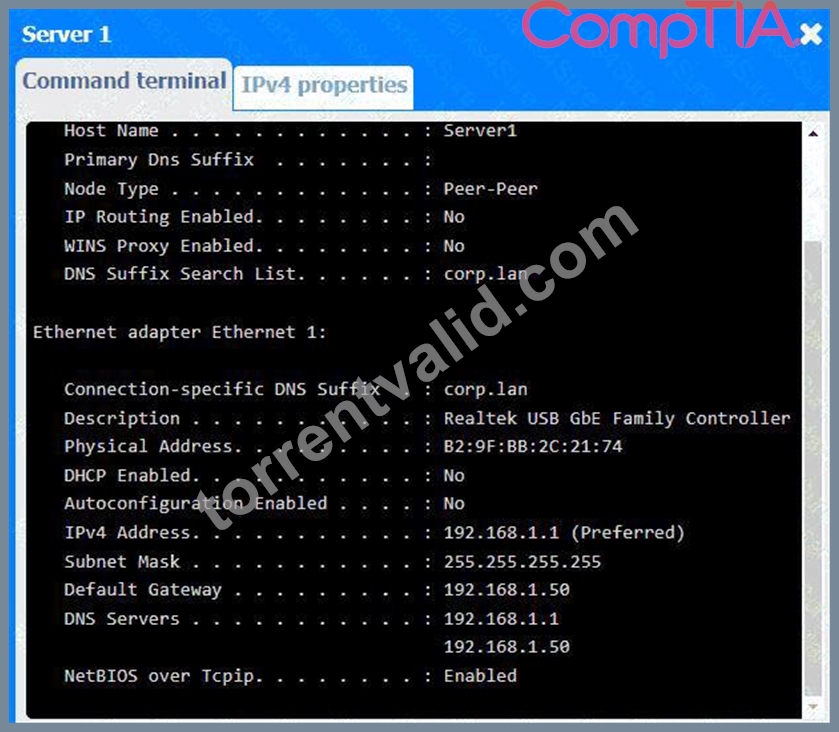
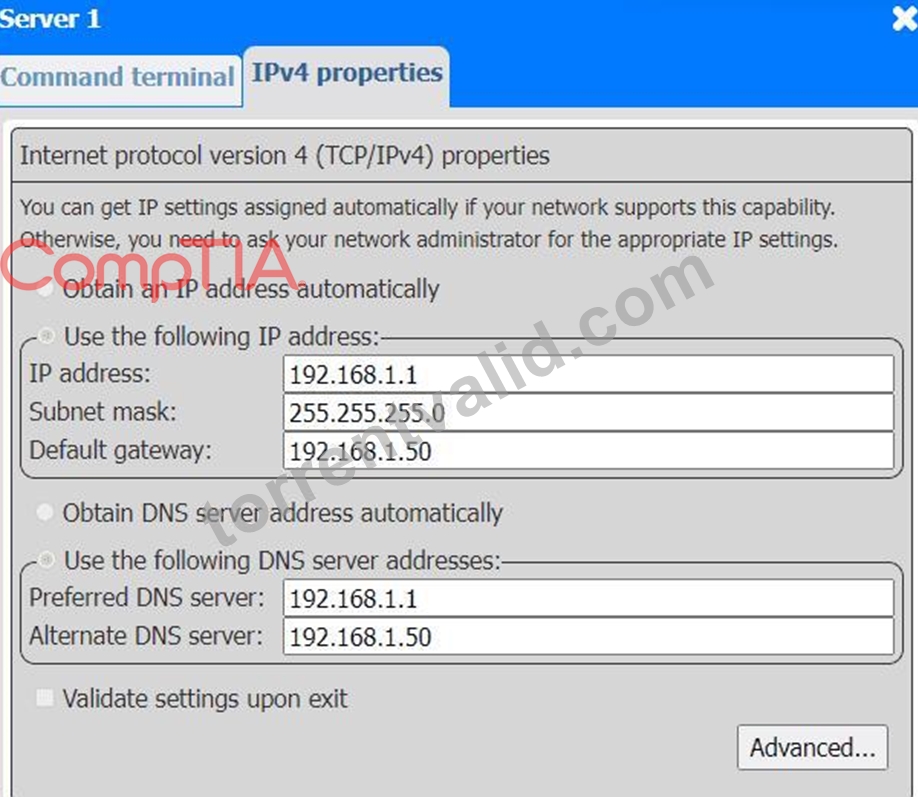
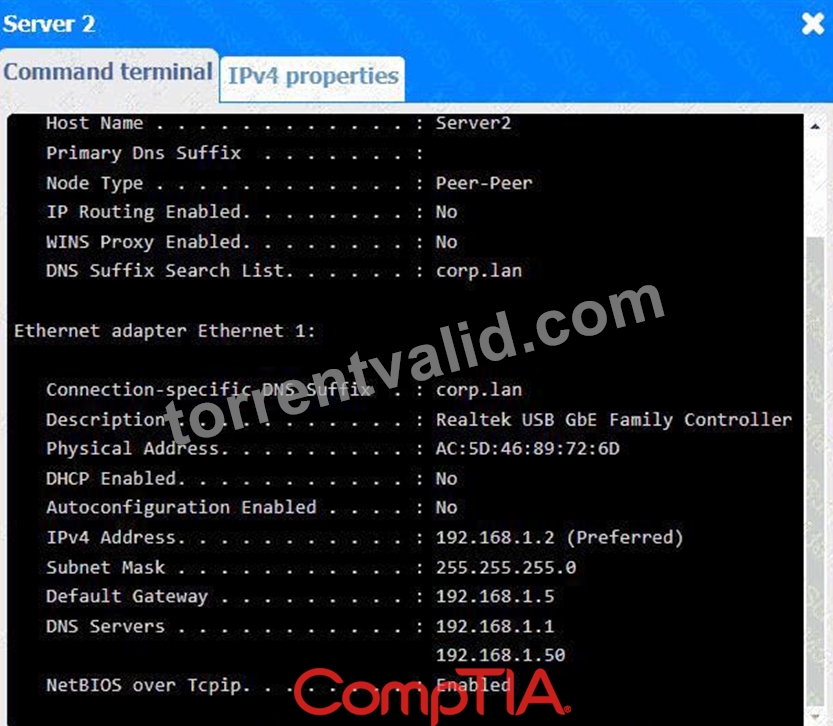
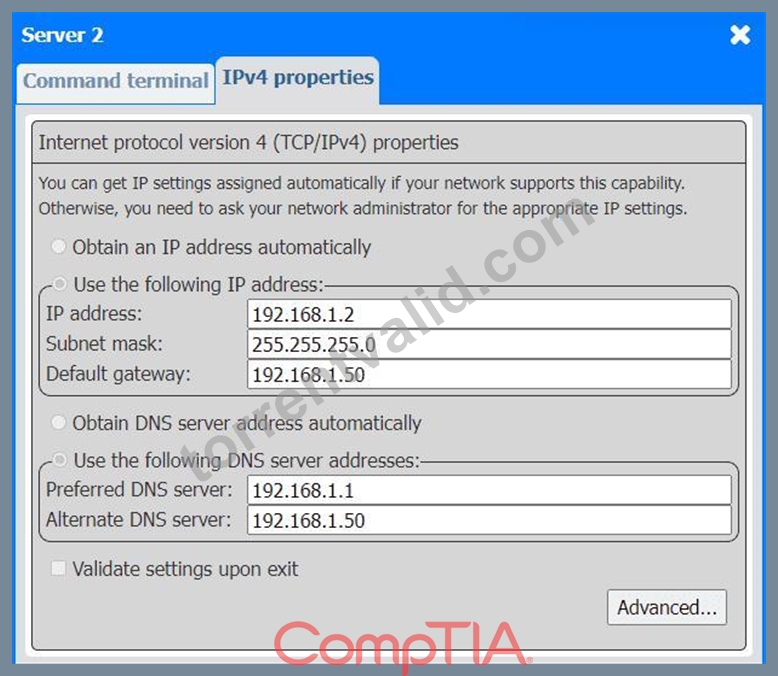
Answer:
Explanation:
See the Explanation and detailed steps below.
Explanation:
Looking at the network configurations and outputs from both PCs and servers, here are the possible issues and solutions:
1. PC 1
Issue: The IP address for PC1 is 192.168.1.1, which conflicts with Server 1 (which also uses 192.168.1.1).
Solution: Change the IP address on PC1 to a unique one within the range, like 192.168.1.3.
2. PC 2
Issue: PC 2 is configured with 192.168.1.2, which conflicts with Server 2 that has the same IP address.
Solution: Update the IP address on PC 2 to something unique, like 192.168.1.4.
3. Server 1
Issue: The IP address for Server 1 is 192.168.1.1, which conflicts with PC1.
Solution: Since Server 1 and PC1 are using the same IP address, change one of them. For Server 1, you could change the IP address to 192.168.1.5.
4. Server 2
Issue: Server 2 is using the IP address 192.168.1.2, which conflicts with PC2.
Solution: Update Server 2 to use a different IP address, such as 192.168.1.6.
General Remediation:
The primary problem here is overlapping IP addresses, leading to connectivity issues. Each device on the network must have a unique IP address. After making these changes, ensure that all devices can communicate properly by testing the connection between devices and verifying they can access shared resources.
NEW QUESTION # 104
A smartphone user reports that the device frequently overheats and occasionally turns off unexpectedly. Upon inspection, a technician discovers that the top of the phone is cracked and the bezel is separating from the frame. Which of the following should the technician do to resolve the issue?
- A. Test the phone with a different charger.
- B. Disable background applications.
- C. Change the phone case.
- D. Replace the battery.
Answer: D
Explanation:
The technician should replace the battery because the cracked casing and separating bezel strongly indicate that the lithium-ion battery has swollen. A damaged or ageing battery can produce internal gases that cause it to expand, pushing the display, bezel, or rear cover away from the device frame. Battery failure can also generate excessive heat and cause unexpected shutdowns when the battery cannot provide stable voltage. This condition is a safety hazard because a swollen battery can rupture, leak, ignite, or damage surrounding components. Testing another charger would not correct physical battery expansion. Changing the phone case would only conceal part of the symptom and could place additional pressure on the damaged battery.
Disabling background applications might reduce processor usage, but it would not resolve visible structural deformation. The phone should be powered off and the battery replaced using appropriate safety procedures.
NEW QUESTION # 105
A user reports issues controlling the cursor on a company-owned laptop. The technician inspects the laptop and discovers a bulge under the trackpad. Which of the following components should the technician replace first?
- A. Motherboard
- B. Trackpad
- C. Heat sink
- D. Battery
Answer: D
Explanation:
A bulge under the trackpad is a common sign of a swollen battery. A failing or expanding battery can physically interfere with the trackpad, causing cursor control issues, and should be replaced immediately for both functionality and safety reasons.
NEW QUESTION # 106
An end user reports that their laptop has a blank screen. A technician observes the keyboard lights are on, and the fan is running. Which of the following should the technician do next?
- A. Replace the inverter
- B. Contact vendor support
- C. Connect to an external monitor
- D. Check the display ribbon cable.
Answer: C
Explanation:
When a laptop powers on but the screen is blank, the quickest way to isolate the problem is to connect to an external monitor. This helps determine if the issue is with the laptop display or with the graphics subsystem.
From CompTIA A+ 220-1101 Official Study Guide, Objective 4.1 - Troubleshoot common hardware problems:
"A blank screen on a laptop with power indicators lit should be tested with an external display first to rule out a faulty screen or ribbon cable." Verified Source:
CompTIA A+ Core 1 (220-1101) Official Study Guide, Chapter 4: Laptop Display Troubleshooting CompTIA Exam Objectives 220-1101, Domain 4.1
NEW QUESTION # 107
A technician upgrades a CPU heat sink with a higher-performing model. While stress testing the computer, the technician finds that the CPU temperatures have drastically increased. Which of the following is most likely causing the issue?
- A. Missing thermal paste
- B. Higher fan RPM
- C. Decreased CPU voltage
- D. Airflow interruption
Answer: A
Explanation:
Whenever a CPU heat sink is removed or replaced, thermal paste must be reapplied. Thermal paste fills microscopic gaps between the CPU heat spreader and the heat sink, ensuring efficient heat transfer. Without it, there is a significant air gap, which acts as an insulator, causing CPU temperatures to rise dramatically even under light load. CompTIA A+ stresses thermal compound application as a key step in CPU cooling installation.
The scenario indicates that temperatures increased drastically after upgrading to a better heat sink. A higher- performing heat sink should improve temperatures, not worsen them-unless a critical installation step was missed. Missing thermal paste is the most common cause of this symptom and easily explains the sudden overheating.
Decreased CPU voltage would lower temperatures, not raise them. Higher fan RPM increases cooling efficiency, not reduces it. Airflow interruption is possible but less likely in a simple heat sink upgrade scenario unless the technician installed the CPU cooler incorrectly; however, the most direct and common cause described by CompTIA is missing thermal paste.
Thus, D is the correct answer.
NEW QUESTION # 108
......
Latest CompTIA 220-1201 Real Exam Dumps PDF: https://passleader.torrentvalid.com/220-1201-valid-braindumps-torrent.html